Cruise control
Introduction
Cruise control keeps the vehicle at a constant speed that the rider selects. It operates in all Speed regulator mode settings.
Firmware
Cruise control is available in firmware 6.025 and later.
How it works
To engage cruise control, these conditions must be true:
- The vehicle speed is more than
Minimum Cruise Speed. - The Reverse and Cutout inputs are not active.
- The controller does not have a fault.
Then the rider activates the cruise input. The controller keeps the vehicle at the speed at which cruise control engaged. It uses the speed regulator gains. Cruise Motoring Torque Limit and Cruise Braking Torque Limit limit the torque that the controller applies to keep this speed.
Note
Cruise Motoring Torque Limit and Cruise Braking Torque Limit can override the usual regen braking settings and the assist mode limits.
Cruise control disengages when one of these conditions occurs:
- The rider activates the cruise input again (button mode) or sets the switch to off (switch mode).
- The controller shows a fault.
- The analog brake, pedal or throttle input increases by more than
Cruise Disengage Increase Threshold. - The Cutout or Reverse input becomes active.
- Firmware 6.027 and later: the vehicle speed decreases below
Cruise Disengage Speed Threshold, as a percentage of the cruise speed. For example, the vehicle cannot keep the speed on a steep slope.
Wiring
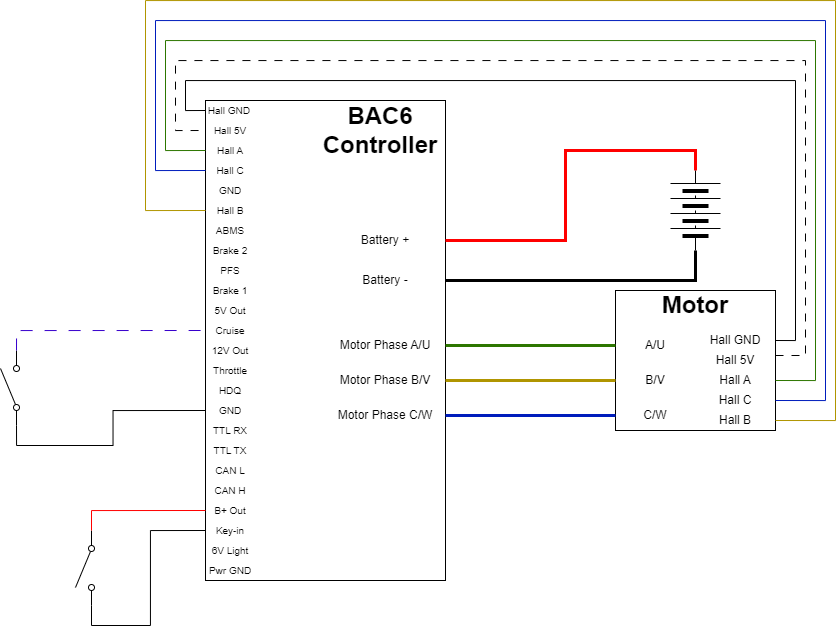
If you connect the cruise switch to Brake1 or Brake2, make sure that the pull-up for that input is enabled.
Configuration
-
In
Cruise Enable Source, enable the bit for each input that the cruise switch is connected to. If one of the selected inputs is active, the cruise input is active.Bit Cruise source Input type 0 Hall C Digital input 1 Hall B Digital input 2 Hall A Digital input 3 PFS Digital input 4 Cruise Digital input 5 Brake1 Analog input, active low 6 Brake2 Analog input, active low 7 ABMS Analog input, active high 8 Throttle Analog input, active high 9 Remote Brake Communication, Remote Digital Commands bit 3 10 Remote Power Switch Communication, Remote Digital Commands bit 6 11 Remote Regen1 Communication, Remote Digital Commands bit 7 12 Remote Regen2 Communication, Remote Digital Commands bit 8 13 Remote Speed Rating Switch Communication, Remote Digital Commands bit 5 14 Throttle Speed Rating Switch 15 Remote Reverse Communication, Remote Digital Commands bit 15 Cruise Enable Source bits
-
Set
Cruise Input Mode:- 0 (Button): a momentary push button engages and disengages cruise control. The controller uses the release of the button.
- 1 (Switch): a latching switch. Cruise control engages when the switch changes from off to on. It disengages when the switch is off.
-
Set
Minimum Cruise Speed, in km/h. Below this speed, cruise control does not engage. -
Set
Cruise Motoring Torque LimitandCruise Braking Torque Limit, as a percentage ofRated motor current. -
Set
Cruise Disengage Increase Threshold, as a percentage of the input range. This value prevents input noise from disengaging cruise control.Example
The throttle is at 50% when cruise control engages, and the threshold is 5%. The throttle must increase to more than 55% to disengage cruise control. If the throttle decreases to 25%, the disengage point decreases to 30%.
-
Firmware 6.027 and later: set
Cruise Disengage Speed Threshold(address 2304), as a percentage of the speed at which cruise control engaged. If the vehicle speed decreases below this value, cruise control disengages. -
Tune
Speed regulator KpandSpeed regulator Kito get the necessary cruise behaviour. Refer to Speed regulation. -
Enable
Features4bit 14 Cruise Control.