Reverse
Introduction
When operating locally, using throttle or pedal inputs, it is possible to command the motor to go in reverse via a switch or a message over the network. This page describes the available inputs and how to configure the parameters accordingly.
Wiring
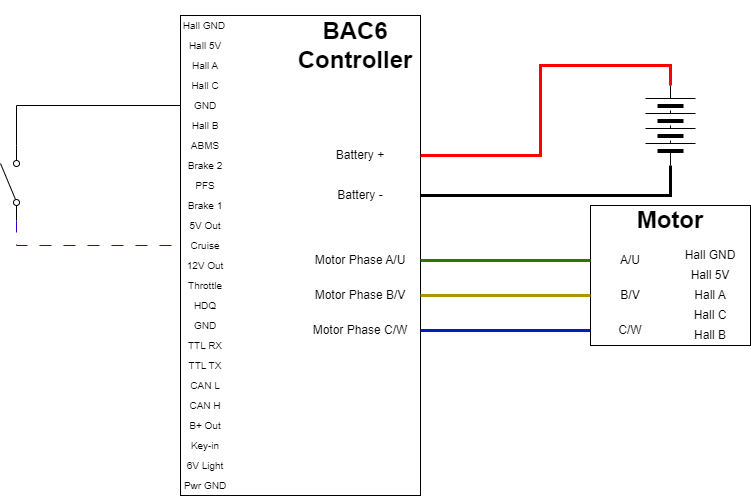
A single throw switch is typically used as the input source and connected to either Cruise/Digital Input 1 or PFS/Digital Input 2. Since the digital inputs are pulled up, the switch would be connected between GND and the chosen digital input.
For network, a command must be sent to Remote Digital Commands bit 15 Enable reverse.
Note
For Firmware 6.019 and below, Cruise/Digital input 1 is the only input option.
In the following example, the Reverse input is connected to cruise as a single throw switch tying the digital input to ground when turned on.
Configuration
-
Enable
Features bit 1Reverse enable on cruise -
Select the
Reverse Enable Source(address 1936) (Firmware 6.020 and above)- 3/ABMS (Firmware 6.021 and above): the analog BMS input is read as a digital value. An input above 3 V requests reverse, and an input below 3 V requests forward. Because this source runs through an ADC, an input near 3 V can toggle repeatedly as noise moves it above and below the threshold.
- 4/Bidirectional throttle (Firmware 6.024 and above): see Bi-directional Throttle.
-
If in a speed limiting mode, limit the reverse speed via
Vehicle jog speed -
Enable
Features bit 7Reverse interlock disable if you wish to be able to switch to reverse without coming to a full stop first. -
Enable reverse and verify
ebike flags bit 8Reverse is active:a. Cruise/PFS: pull input to ground. e.g., close the switch. b. For network, a command to enable
Remote Digital Commands bit 15Enable reverse must be sent (Firmware 6.020 and above)