Motor Temperature Sensor
Introduction
Temperature sensors in motors are the ideal way to monitor the motor's health and avoid over-temperature damage to the motor and its components.
Wiring
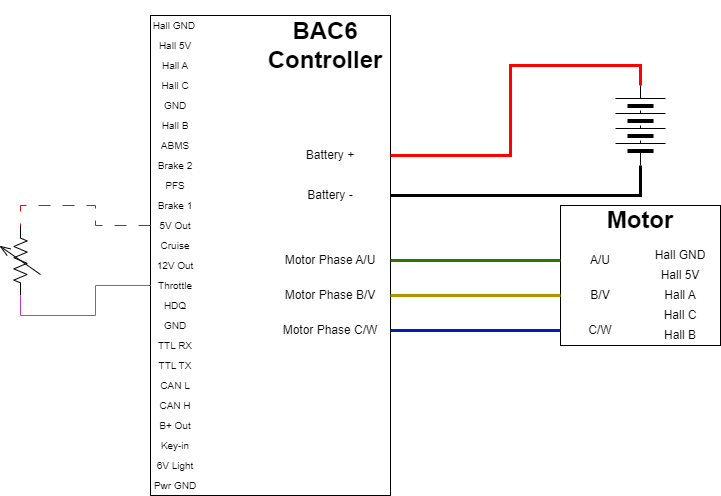
Thermistors can be wired to any of the analog inputs (Throttle/Analog Input 1, Brake1/Analog Input 2, Brake2/Analog Input 3 or ABMS/Analog Input 4) depending on whether an NTC or PTC thermistor is used.
Note
If the motor temperature and speed sensor share a single input, see Motor Temperature and Speed on single input for the wiring limits that apply to your firmware version.
For NTC (resistance decreases with temperature increase)
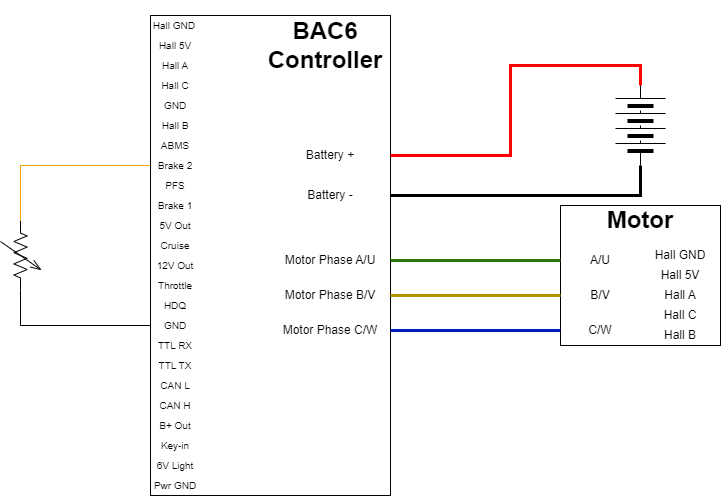
For PTC (resistance increases with temperature increase)
Configuration
-
Enable
Features bit 5Motor temp sensor enable. -
Select the
Motor temperature source. -
Enter the
motor temperature sensor voltagefor each of the following:-
Motor temperature feedback V at 0 C -
Motor temperature feedback V at 25 C -
Motor temperature feedback V at 50 C -
Motor temperature feedback V at 75 C -
Motor temperature feedback V at 100 C -
Motor temperature feedback V at 125 C
-
The thermistor datasheet can be used to estimate the motor temperature sensor voltage for each temperature.
Note
The temperatures outside of 0 °C through 125 °C are linearly extrapolated for temperatures above 125 °C and below 0 °C.
Brake1 or 2 to Hall Ground formula
If tying the sensor from Brake 1/Analog input 2 or Brake 2/Analog input 3 to Hall ground, on a motor with Hall position sensors, this formula can be used to better estimate the motor temperature sensor voltage for each given sensor temperature resistance (Rtherm).
Motor temperature feedback V at C = (4750*(172268*(Rtherm^2) + 13913806737*Rtherm + 828480786525))/(807*(253*Rtherm + 20419350) *(1417*Rtherm + 5823153))
Short detection
In firmware 6.020 and higher, the controller uses the Motor Temperature Short Detection Window (address 1948), in volts, to detect a motor temperature sensor shorted to 5 V or to ground. If the sensor voltage is within this window of 5 V or ground, the controller triggers the Faults bit 10 Motor over temperature fault. See Faults and Warnings.
Fault and warning settings
- Motor over temperature (
Faultsbit 10): to disable it, disableFeaturesbit 5 Motor temp sensor enable. This also disables motor temperature foldback. To keep the sensor but stop the fault from triggering, raiseMotor over temperature trip threshold(address 90). Do not set it above the limit recommended by the motor manufacturer. - Motor temperature foldback (
Warningsbit 9): see Motor foldbacks.
Troubleshooting
-
There are a lot of fluctuations in my motor temperature
If using the Hall ground, the thermistor output can be affected by high frequency noise resulting in fluctuations in the temperature readings
-
How can I test if my voltage values are correct?
The simplest way to test the accuracy of the temperature feedback involves using a hand-held thermometer and two known temperatures such as ice water and boiling water following the steps below. Verify
motor temperaturein BACDoor® matches the expected temperature on your thermometer, i.e. ~0 °C for ice water or ~100 °C for boiling water.