Battery Foldbacks
The controller can be configured to make use of the battery voltage provided by the controller to fold back the motor current limit to preserve long-term battery life. Folding back peak motor output current based on voltage prevents the battery from experiencing an excessive depth of discharge which can reduce the battery’s life cycle.
Battery current limiting based on battery voltage is configured with the Low battery foldback starting voltage and Low battery foldback end voltage parameters. Both are a percentage of Rated system voltage. Below the Low battery foldback starting voltage, the controller folds back the peak motor current limit, reaching 0 A at the Low battery foldback end voltage.
If using SOC foldbacks, set the voltage foldbacks out of range to prevent the voltage foldbacks competing with SOC foldbacks.
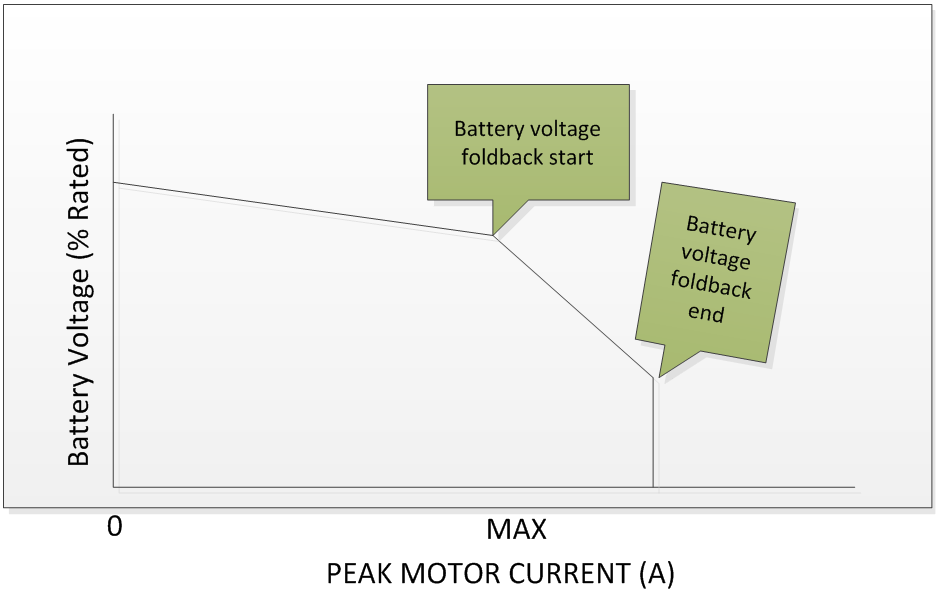
To disable low battery voltage foldback, set Low battery foldback starting voltage and Low battery foldback end voltage to 0.
The BAC series of controllers can be configured to make use of the battery state of charge (SOC) information provided by the battery to fold back the motor current limit based on the SOC to preserve long-term battery life.
SOC limiting of battery current is configured with the Low battery state of charge foldback starting capacity and Low battery state of charge foldback end capacity parameters. Both are a percentage of SOC. Below the Low battery state of charge foldback starting capacity, the controller folds back the peak motor current limit, reaching 0 A at the Low battery state of charge foldback end capacity.
If using voltage foldbacks, set the SOC foldbacks out of range to prevent the SOC foldbacks competing with voltage foldbacks.
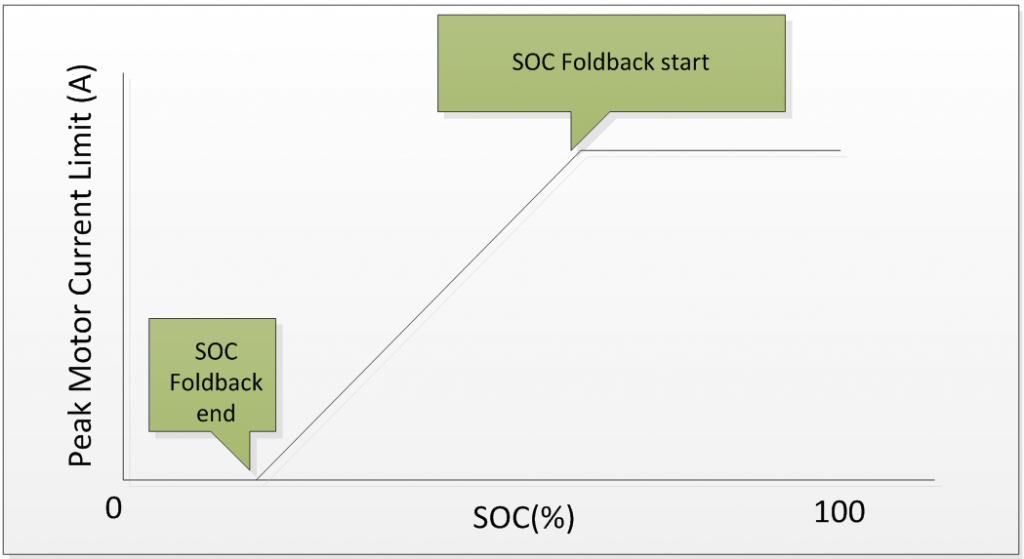
To disable low battery SOC foldback, set Battery management interface type to 0 (None), or set Low battery state of charge foldback starting capacity and Low battery state of charge foldback end capacity below 0%.
Enable Motor features bit 3 Disable motor I^2t enable battery I^2t to calculate I2T based on battery current instead of motor current. This is useful when you have a motor temperature sensor handling foldbacks.
The battery current for calculating the respective percentages below is equal to Rated motor power (Race mode PAS power) divided by Rated system voltage.
For example, if your Rated motor power (Race mode PAS power) is equal to 960 W and the Rated system voltage is 48 V, your battery current "nameplate rating" for these calculations is 960 W / 48 V = 20 A. If your continuous battery current is 15 A, you would set Overload continuous current to 15 A / 20 A = 75%.
Heating setup
If your battery current is between Overload continuous current and Overload heating current, you'll have a gain between 0 and 1. Anything above Overload heating current, the gain is 1 on the overload accumulation heating formula. This is all relative to the Overload heating time. It will take Overload heating time at or above Overload heating current to reach 100% on the overload accumulator. If you are at the midpoint between the Overload continuous current and the Overload heating current, it will take twice as long to reach 100%.
You always start at 0% on the overload accumulator after restarting the controller; keep this in mind. For example, you trigger the overload warning, restarting the controller will clear it, and you might now overheat the motor/battery.
Cooling setup
If your battery current is between Overload continuous current and Overload cooling current, you'll have a gain between 0 and 1. Anything below the Overload cooling current, the gain is 1 on the overload accumulation cooling formula. This is all relative to the Overload cooling time. It will take Overload cooling time at or below the Overload cooling current to reach 0% on the overload accumulator. If you are at the midpoint between the Overload continuous current and the Overload cooling current, it will take twice as long to reach 0%.
Foldbacks
Overload foldback start is when you want to start reducing battery current based on the overload accumulator value. Overload foldback end is when you want to cut all battery current based on the overload accumulator value. Battery current reduction is linearly interpolated between start and end foldbacks.
To disable I2T foldback, set Overload heating current greater than 100%.
Note
This feature is available in firmware 6.023 and higher.
The controller can reduce battery discharge and regen current when the battery temperature is high. This feature is enabled when both of the following parameters are set to positive integers:
Hot battery foldback starting temperature(address 1969): the battery temperature, in °C, at which the controller starts to reduce discharge and regen current. Above this temperature, theWarnings2bit 8 Hot battery foldback is set.Hot battery foldback ending temperature(address 1970): the battery temperature, in °C, above which the controller limits both discharge and regen current to 0.
Between the two temperatures, the controller linearly folds back discharge and regen current from 100% to 0%.
To disable hot battery temperature foldback, set either parameter to 0.
The controller reduces current when the battery temperature or the controller temperature falls below Cold battery foldback starting temperature. Current is folded back linearly, reaching 0 A at Cold battery foldback ending temperature. While this foldback is active, Warnings bit 14 Low temperature battery / controller foldback is set.
Cold battery foldback starting temperature(address 143): the temperature, in °C, below which the controller starts to reduce current.Cold battery foldback ending temperature(address 144): the temperature, in °C, at which current is folded back to 0 A.
To disable cold temperature foldback, set both temperatures well below the expected operating temperature range. See the controller specification sheet for the lower operating temperature limit.
The controller reduces regen current when the battery voltage is high, to protect the battery from overcharging.
High battery foldback starting voltage(address 194): the battery voltage, as a percentage ofRated system voltage, above which the controller starts to fold back regen current. Above this voltage,Warningsbit 8 High battery voltage foldback is set.High battery foldback end voltage(address 195): the battery voltage, as a percentage ofRated system voltage, at which regen current is folded back to 0 A.
To disable high battery voltage foldback, set both voltages above the highest voltage the battery can reach.
The controller reduces regen current when the battery state of charge is high, to protect the battery from overcharging.
High battery state of charge foldback starting capacity(address 135): the state of charge, in %, above which the controller starts to fold back regen current. Above this value,Warningsbit 12 High battery SOC foldback is set.High battery state of charge foldback end capacity(address 136): the state of charge, in %, at which regen current is folded back to 0 A.
To disable high battery SOC foldback, set Battery management interface type to 0 (None), or set both values above 100%.