Motor Temperature and Speed on single input
Introduction
Some motors have motor or wheel speed and motor temperature on a single output. This page instructs you on how to set up this type of sensor input with your BAC controller.
This feature works as follows:
- Speed is calculated when the sensor voltage pulses below the threshold value.
- The motor temperature is calculated using the input voltage, excluding pulses below this threshold.
Wiring
The motor temperature and speed sensor can be wired to any of the analog inputs (Throttle/Analog Input 1, Brake1/Analog Input 2, Brake2/Analog Input 3 or ABMS/Analog Input 4). Both NTC and PTC thermistors are supported.
The motor temperature and speed sensor must be wired to Brake2/Analog Input 3. Only NTC thermistors are supported.
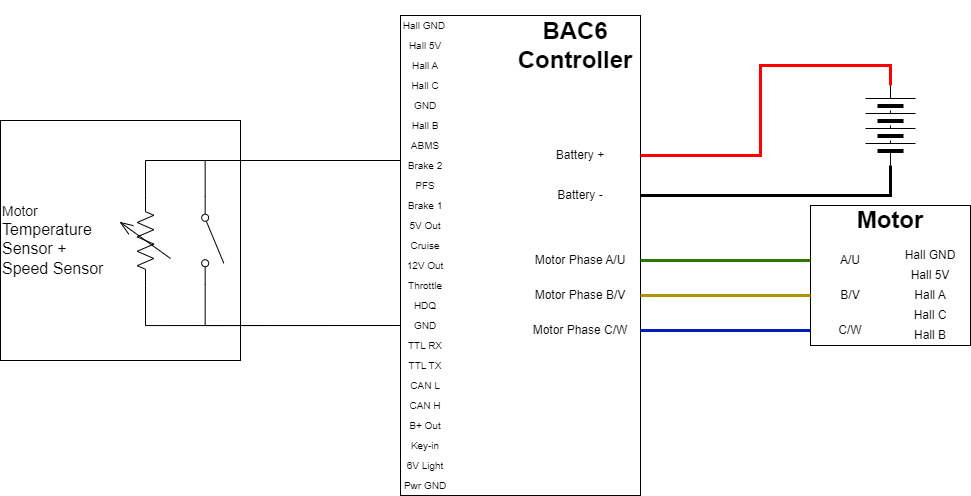
Configuration
- Setup according to Speed Sensor Setup.
- Setup according to Motor Temperature Sensor
- Enable
Motor Features bit 4Single input motor temperature and speed pulses - Set the
voltage threshold for shared digital input + motor temperature source.- This value should be the voltage below which the temperature of your motor should not be. For example, if your voltage linearly decreases as temperature increases and your 100 °C temperature is 0.5 V and your motor should not go above 100 °C. You could set your threshold as 0.5 V or lower.
- Account for some float on the voltage when the speed sensor is active. Thus, a deadband, for example 0.2 V, may be required and your threshold should not be lower than this or risk false readings from missed pulses.
- The controller also uses this threshold to detect a stuck input, using the timeout set in the next step.
-
Set the
Shared Motor Temp and Wheel speed timeout(parameter 1951), in ms. This is the maximum time the motor can operate continuously while the input stays below thevoltage threshold for shared digital input + motor temperature source. If it is not configured, it defaults to 5000 ms (5 seconds).Example
When on a hill and the motor is providing minimum torque resulting in slow/no movement, the speed sensor could be pulled down for an extended period. During this time, the controller cannot read the actual motor temperature. The timeout prevents the controller from damaging the motor due to overheating.
- Setup according to Speed Sensor Setup.
- Setup according to Motor Temperature Sensor
- Enable
Motor Features bit 4Single input motor temperature and speed pulses - Set the
voltage threshold for shared digital input + motor temperature source.- This value should be the voltage below which the temperature of your motor should not be. For example, if your voltage linearly decreases as temperature increases and your 100 °C temperature is 0.5 V and your motor should not go above 100 °C. You could set your threshold as 0.5 V or lower.
- Account for some float on the voltage when the speed sensor is active. Thus, a deadband, for example 0.2 V, may be required and your threshold should not be lower than this or risk false readings from missed pulses.
Limitations/Protections
When the motor temperature goes above 100 °C, the controller enables a flag. This 100 °C threshold is fixed and cannot be changed. Once this flag is enabled, if the controller sees the input voltage below the threshold for a certain period, the controller sets the motor temperature to a very high value (500), disabling any power from controller to motor. As soon as the voltage read on the input source is above the threshold, the motor temperature goes back to normal calculation.