Throttle
Introduction
Throttle sensors usually provide a 0-5 V signal which varies within a specific range depending on the type. ASI Controllers only support 0-5 V hall-based and resistive analog throttles.
Common throttle inputs vary from 1 V to 4 V, where anything outside that range can be detected as a fault. I.e., missing connections may produce a 0 V or 5 V signal causing the controller to fault and protect against accidental start-up.
Wiring
A throttle typically has 3 wires: 5 V power, GND, and a signal wire. The throttle signal can be wired to use any analog input, typically Throttle/Analog input 1 or ABMS/Analog input 4.
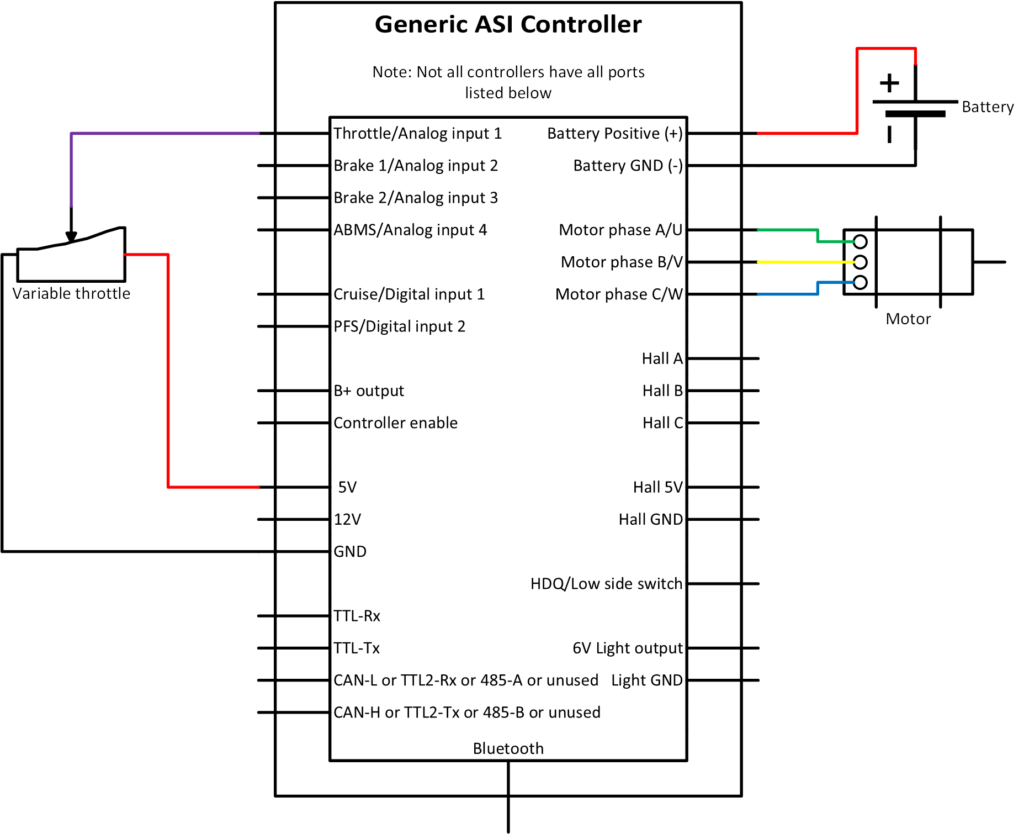
Refer to the peripheral input sources quick sheet in Hardware Inputs to ensure you choose the right input pin and avoid the need to rewire inputs later. For example; if you have a torque sensor, it uses input Throttle/Analog input 1 and throttle would then use ABMS/Analog input 4 instead.
For a two-controller setup (dual-motor), where Master/Slave is not possible, using a single throttle, one controller will provide both the power and ground for the throttle, while both controllers share the signal input.
Configuration
Danger
Ensure vehicle is secured in case the motor engages unexpectedly while manually configuring your throttle.
TIP
Make a backup copy of the parameter file often by saving it to file as shown before. It can be sent to ASI for support or you can revert if strange behaviour occurs.
TIP
Set Control command source to 0 / serial stream to prevent the motor from accidentally spinning while manually setting the throttle.
- With the throttle fully off (no throttle applied), read the appropriate analog input and then enter it in
Throttle off voltage. -
With the throttle fully open (full throttle applied), read the appropriate analog input and then enter it in
Throttle full voltage. -
Set
Throttle sensor sourceto the valueThrottle Sensor Source value Input 0 Throttle 1 Brake 1 2 Brake 2 3 CAN Torque 5 Network Voltage 6 ABMS -
This step will enable your throttle. Set
Control command sourceto 1 / throttle . -
Ensure you do not have any faults, and test the throttle responds accordingly. If not, see troubleshooting.
It is recommended that the Throttle fault range, Throttle deadband threshold be left at the factory default setting of 0.2 V initially.
If the throttle voltage is less than or greater than the Throttle sensor source +/- Throttle fault range, this range represents a fault condition. The Throttle deadband threshold value prevents unintended motion from occurring when the throttle is fully closed and ensures a 100% throttle command when fully open.
Throttle setpoint example
A sample throttle mapping is shown in the figure below, using the following parameter values:
-
Throttle deadband threshold= 0.2 V -
Throttle fault range= 0.2 V -
Throttle off voltagereading = 0.8 V -
Throttle full voltagereading = 4.2 V
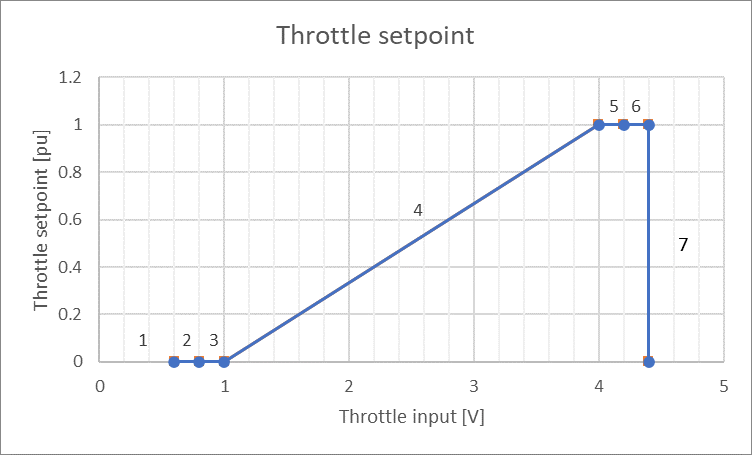
Where
-
Less than 0.6 V will trigger a fault:
Faults bit 11Throttle voltage outside range, (flash code 2,4) -
0.6 V to 0.8 V is in the
Throttle fault range -
0.8 V to 1 V is in the throttle deadband to prevent unintended motor engagement
-
1 V to 4 V is the throttle operating window, where 1 V = 0%
throttle setpointand 4 V is 100%throttle setpoint -
4 V to 4.2 V is the throttle deadband, ensuring you reach 100% Command output
-
4.2 V to 4.4 V is in the throttle upper fault range
-
Greater than 4.4 V will trigger a fault:
Faults bit 11Throttle voltage outside range, (flash code 2,4)
Dual analog throttle
In firmware 6.025 and higher, you can connect a second, redundant analog throttle. The controller calculates a secondary throttle setpoint from this input. If it differs from the primary throttle setpoint by more than the Dual analog throttle fault threshold, the controller triggers Faults3 bit 3 Dual throttle out of range and forces the primary throttle setpoint to 0. This fault clears by itself once the two setpoints are within the threshold again.
- Connect both throttle signals (primary and redundant) to their analog inputs.
- Calibrate the primary throttle as described in Configuration.
- Set the
Secondary throttle source for dual analog throttle(address 1983) to the redundant throttle input. It has the same options as theThrottle sensor source. - Move the throttle until the primary throttle voltage is at the start of its linear range: the
Throttle off voltageplus or minus theThrottle deadband threshold, for a positive or negative slope. Record the voltage on the redundant throttle input as theSecondary throttle off voltage(address 1982). - Repeat step 4 at the end of the linear range, using the
Throttle full voltagewith theThrottle deadband thresholdoffset in the opposite direction. Record the voltage on the redundant input as theSecondary throttle full voltage(address 2004). - Enable
Features4bit 3 Dual analog throttle (address 1974). - Move the throttle through its full range and check that the
throttle setpointand thesecondary throttle setpoint(address 1718) match within a small margin for noise. - Set the
Dual analog throttle fault threshold(address 1981) to the percentage difference between the two setpoints that should trigger a fault.
Throttle sensitivity
In firmware 6.020 and higher, you can change how the throttle input maps to the throttle command.
- Enable
Features2bit 12 Throttle Sensitivity (address 174). - Set
Throttle Sensitivity(address 2302) to a value between 0 and 8.
The output throttle setpoint is calculated as follows, where the input throttle setpoint is between 0 and 100%:
Output throttle setpoint = (Input throttle setpoint)Throttle sensitivity
- A value of 1 gives the same linear response as when the feature is disabled.
- A value greater than 1 gives finer control at low throttle input.
- A value between 0 and 1 gives finer control near maximum throttle input.
Digital throttle input
In firmware 6.020 and higher, you can use a digital input to enable or disable the throttle, for example as a redundant throttle switch.
- Set the
Digital throttle sensor source(address 244): 0 = Cruise, 1 = PFS, 2 = Throttle, 3 = Brake1, 4 = Brake2, 5 = ABMS. - Enable
Features3bit 11 Redundant throttle.
Inputs scaled to available power
In firmware 6.024 and higher, you can map the throttle input to the available output current instead of to Rated motor current. This makes the full throttle range usable even when the available output current is limited, for example by the active Rated motor power parameter, battery limits or other protections.
- Enable
Features4(address 1974) bit 10 Input target scaling to Available Power.
When this bit is enabled, the requested torque command calculated from the throttle setpoint is scaled by the present power limit of the controller.
Example
If the power limit from current, battery, motor and other protections is 37% of the maximum, a 0-100% throttle input corresponds to a 0-37% requested torque output.
Fault and warning settings
WARNING
Changing a throttle fault to a warning, or widening the fault range, lets the motor keep running with a throttle signal that may be faulty. Only do this when another part of the system protects against a throttle failure.
- Throttle voltage outside range (
Faultsbit 11): to report it as a warning instead of a fault, enableFeatures2bit 4 Throttle fault changed to warning. The controller then sets Throttle out of range warning (Warnings2bit 0) instead. - Throttle out of range warning (
Warnings2bit 0): if you do not want the warning either, increaseThrottle fault range(address 152) until it no longer triggers. - Dual throttle out of range (
Faults3bit 3): to disable it, disableFeatures4bit 3 Dual analog throttle. To keep dual analog throttle without the fault, setDual analog throttle fault thresholdto 100%.
Troubleshooting
Throttle voltage does not change
-
Ensure the throttle input is connected to the correct input
-
Ensure you are watching the correct input
-
Ensure the throttle is connected correctly to power, ground and signal
- Never trust the wire colours: Red is not always 5 V, Black is not always GND, White is not always signal
-
If it reads 0 V, it could be shorted to ground or disconnected if it is a pulled down input.
-
If it reads 5 V, it could be shorted to power or disconnected if it is a pulled up input.
-
If it reads higher, it could be shorted to another power source (B+, 12 V, etc.)
Brake and cutout enabled
For example, eBike flags bit 1 Cutout enabled prevents the motor from engaging, this is generally coupled with eBike flags bit 0 Brake enabled. This means the brake is enabled and is causing the motor to cutout. Solutions include:
-
Disconnect your brakes, they may be pulling the brake voltage out of range.
-
Set
Cutoff brake sensor sourceto 4 / network if not already to stop reading the external brake sensor source and clear the two eBike flags (cutout and brake). -
Poll the chosen
Cutoff brake sensor sourcevoltage, ensure it is above theAnalogue brake full voltagevalue. If for example, your voltage source is 3.5 V and the analogue brake full voltage is 4 V, the cutout will be enabled.
Faults and warnings
Read parameters faults, faults2, warnings and warnings2 for potential reasons the motor will not engage. See the Faults and warnings troubleshooting for more information.
No motor assistance when on the throttle
Are the Rated motor power (Race mode Throttle power) and Rated motor power (Street mode Throttle power), if using alternate power mode, filled in with the motors rated power for throttle. These must be filled in for the throttle to command motor assistance when in their respective power mode.
No motor assistance when rolling backwards
If Regeneration battery current limit or Maximum braking torque are set to 0. A slight rolling back of a direct drive vehicle will not allow forward motion until the vehicle is completely stopped. To avoid this type of behaviour set the set these sufficiently high. The Regeneration battery current limit limits battery current used for braking torque and Maximum braking torque limits braking torque motor phase current.