Cruise Control
Introduction
The cruise control feature allows users to operate the motor at a constant speed at their choosing when in torque mode (Speed Regulator Mode 1) or torque with speed limiting mode (Speed Regulator Mode 2).
Wiring
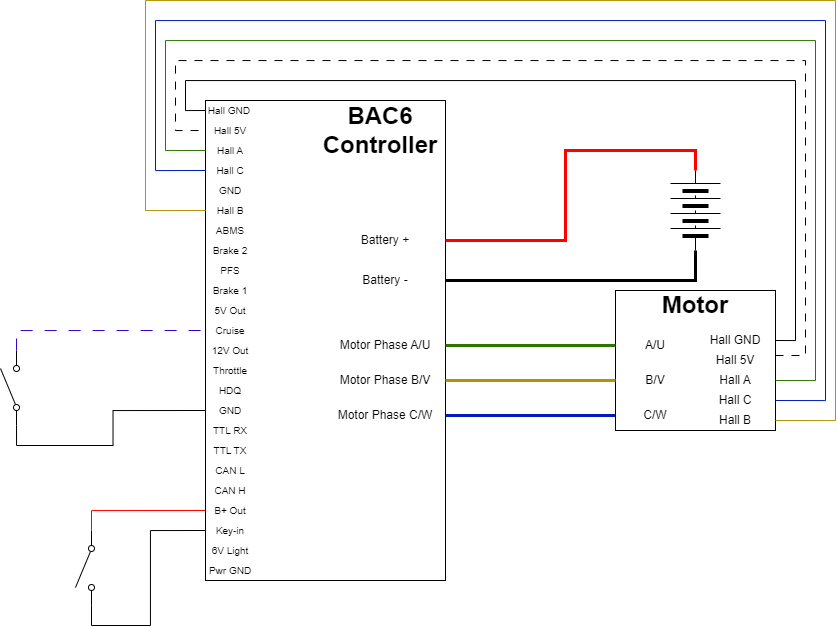
Configuration
-
Choose the source (or sources) the cruise switch is connected to by enabling the appropriate bit in
Cruise Enable SourceBit Cruise Source Input Type 0 Hall C Digital input 1 Hall B Digital input 2 Hall A Digital input 3 PFS Digital Input 4 Cruise Digital Input 5 Brake1 Analog Input, Active low 6 Brake2 Analog Input, Active low 7 ABMS Analog Input, Active High above 2.7 V 8 Throttle Analog Input, Active High above 2.7 V 9 Remote Brake Comms, Remote Digital Commands Bit 3 10 Remote Power Switch Comm, Remote Digital Commands Bit 6 11 Remote Regen1 Comms, Remote Digital Commands Bit 7 12 Remote Regen2 Comms, Remote Digital Commands Bit 8 13 Remote Speed Rating Switch Comms, Remote Digital Commands Bit 5 14 Throttle Speed Rating Switch 15 Remote Reverse Comms, Remote Digital Commands Bit 15 -
In the
Cruise Input Modeparameter, enter 0 if using a momentary push button to engage and disengage cruise control or enter 1 if using a latching switch - Configure the
Minimum Cruise Speed(in km/h) that the vehicle must be over to enable cruise control - Configure the
Cruise Braking Torque LimitandCruise Motoring Torque Limitas a percentage of motoring current - Configure the
Cruise Disengage Increase Threshold. While cruise control is engaged, the controller tracks the pedal, throttle and analog brake setpoints. An increase in any of these setpoints above its minimum by more than this percentage disengages cruise control. - Enable
Features4 Bit14Cruise Control to enable the cruise control feature