Assist Configuration
Introduction
Assist levels allow the rider to adjust their maximum power and speed. Depending on the type of displays or buttons that are used, these levels can be adjusted.
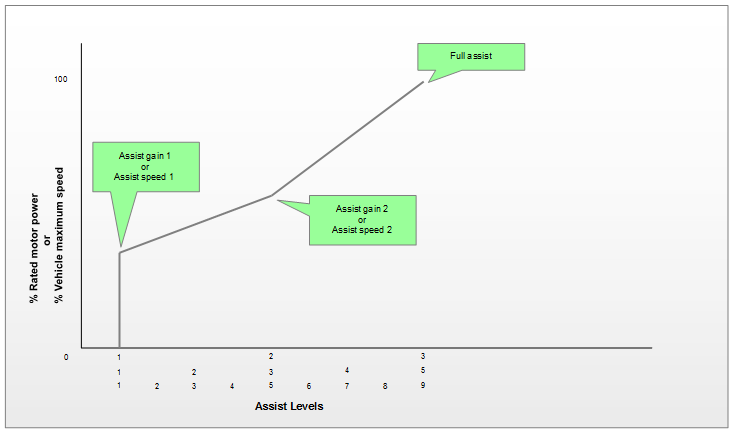
Assist levels set the assist gain and assist speed limit, these parameters limit the output current/power and active speed limit if in a speed-limiting mode respectively. Their range is 0 to 1.0 pu, for 0% and 100% of the active motor output power limit or speed limit respectively.
Assist mode source configuration
assist speed limit and assist gain always = 1.0 pu.
Note
ASI Supports analog voltage ranges from 0-5 V (devices such as JT405 and potentiometers are commonly used)
Assist low voltage reading uses Assist gain 1 and Assist speed 1 for the low assist level and linearly interpolates to 100% assist at Assist high voltage reading.
- Connect the analog assist device should be connected to the Brake 2 input of the controller.
- Set
Assist mode sourceto 1 (analog) - Poll and read the
brake 2 voltageinput to measure the analog assist levels. - Enter the level 0 (or low assistance switch position if not a POD) assist voltage (no LEDs on) into
Assist low voltage reading - Enter the level 3 (or high assistance switch position if not a POD) assist voltage into
Assist high voltage reading
Uses Assist gain 1 through Assist Gain 3 and Assist speed 1 through Assist Speed 3 as the 3 points about which it interpolates the assist gain and assist speed limit
Note
Displays typically send a PWM value, but are not always consistent. Thus, a 3-assist level display may not match 1:1 with the values set above and may use interpolation to determine the assist gain and assist speed limit from that.
This applies to assist levels from displays sending more than 3 "Assist levels". For example, with 5 assist levels, 1 typically maps to Assist gain 1 and Assist speed 1, 2 will interpolate to a value between Assist gain 1 and Assist gain 2, and Assist speed 1 and Assist speed 2, etc.
Assist level 0 from the display will result in assist gain and assist speed limit being set to 0 pu, assuming the display sends a PWM value.
Write to speed limit gain and assist limit gain respectively. Renamed Display speed limit command and Display assist level command at some point.
Set Assist gain 1 through Assist Gain 9 and Assist speed 1 through Assist Speed 9 respectively.
Write to Remote assist mode a value between 0 and 9 to set the assist leveland assist speed limit respectively. Note, 0 corresponds to assist level and assist speed limit being set to 0 pu.
Note
This source is available in firmware 6.021 and higher.
The Cruise and PFS digital inputs set the assist level:
| Cruise | PFS | Display assist level command |
Assist gain and speed used |
|---|---|---|---|
| Active | Any | 1 | Assist gain 1 (address 219) and Assist speed 1 (address 241) |
| Not active | Not active | 2 | Assist gain 2 (address 245) and Assist speed 2 (address 246) |
| Not active | Active | 3 | Assist Gain 3 (address 250) and Assist Speed 3 (address 251) |
- Set
Assist mode sourceto 10 (GPIO). - Set
Assist gain 1toAssist Gain 3andAssist speed 1toAssist Speed 3.
Note
This source is available in firmware 6.026 and higher.
- Configure the
Momentary Assist Sourceparameter to the digital input connected to the momentary switch - Configure the
Momentary Assist Modesparameter to the total number of assist modes for the momentary button to cycle through. - Configure the Assist gain and Assist speed parameters for the number of assist modes selected.
note:
this number must include the 'zero-assist' mode, so if you have 6 configurable gains/speeds, this parameter would be set to '7'.
Power mapping speed reference
In firmware 6.021 and higher, you can choose whether the speed based foldback powermap uses the vehicle top speed or the speed limit of the current assist level.
- Enable
Features3bit 9 Power Mapping uses max speed to base the power map on the top speed. - Disable it to base the power map on the current assist level speed limit.
Throttle bypass assist
Throttle bypass assist lets the throttle ignore the assist levels, while the pedals still respect them. Enable one of the following Features3 (address 1919) bits:
- Bit 0 Throttle bypass assist level including 0 assist
- Bit 5 Throttle bypass if assist level above 0
Pedal ignores throttle bypass
In firmware 6.025 and higher, the pedal input can ignore the throttle assist bypass. The controller scales the pedal setpoint by the assist level before applying any throttle assist level bypass, and before choosing between the throttle setpoint and the pedal setpoint. This prevents a small throttle input from causing a large torque increase when the vehicle is at a low assist level with high pedal input.
- Configure throttle bypass assist as described above.
- Enable
Features4(address 1974) bit 15 Pedal Ignores Throttle Bypass.